
Live market feed
Checkmate receives supported tick and candle context for the selected asset.
Checkmate organizes live market context, technical indicators, confidence scoring, and guided demo-account workflows into one focused command center for Pocket Option users.
Monitors supported market conditions and updates the interface continuously.
Shows how strongly configured analysis factors agree at that moment.
Lets customers learn the workflow before deciding whether to subscribe.
Explore the command center, professional charting, AI decision intelligence, research tools, and enterprise market-data infrastructure.
Checkmate organizes technical context into a focused interface so users can learn the product and evaluate its signals without going in blind.
Continuously evaluates supported market conditions and surfaces structured opportunities.
Combines multiple filters into an easy-to-read confidence score.
Uses RSI, moving averages, price action and momentum context.
Encourages consistent trade sizing, cooldowns and decision discipline.
A guided 24-hour evaluation designed for demo-account learning.
Signals, scanner status and analysis appear in one focused command center.
These views come from Checkmate v4.2.20 itself. The product communicates qualified opportunities, lower-confidence conditions, and situations where waiting is the more disciplined response.
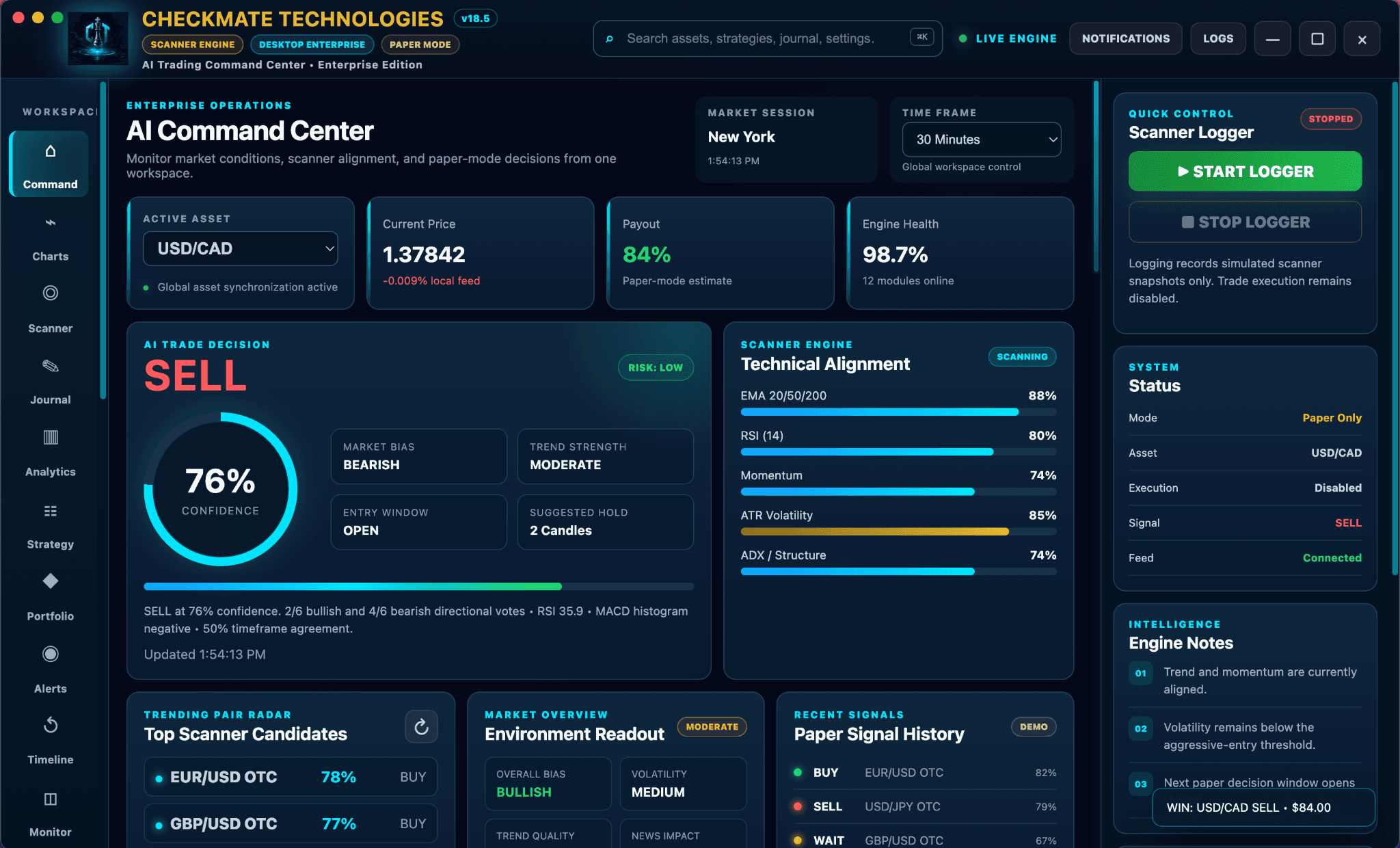
This simulated walkthrough shows how the interface progresses from market scanning to a qualified demo setup. It demonstrates the product workflow, not guaranteed trade performance.
Price structure, momentum, trend alignment, and volatility are being reviewed.
Demonstration values are simulated for product education.
The command center puts scanner activity, market context, confidence and signal details in one place. During the trial, customers can explore the workflow on a supported demo account before choosing a plan.
Checkmate organizes multiple analytical inputs into a readable workflow so customers can understand why the interface is showing BUY, SELL, or WAIT.
Checkmate receives supported tick and candle context for the selected asset.
The application evaluates trend, RSI, momentum, structure, and configured filters.
The dashboard summarizes how strongly the configured factors agree.
The user sees the current state, market context, timing window, and explanatory evidence.
The trader remains responsible for deciding whether to take any action.
Create your account and activate the 24-hour demo trial.
Follow the guided tour and understand every panel before use.
Use Checkmate with a supported Pocket Option demo account.
Choose the monthly plan that fits your preferred feature set.
The launch experience combines a concise written explanation, guided onboarding, and short video lessons. Customers can learn what each panel means, how confidence is displayed, and what the trial does and does not provide.
Create an account, activate the 24-hour trial, and confirm demo access.
Open Pocket Option demo mode and verify the supported environment.
Understand scanner status, signal direction, confidence, and context.
Use the trial to judge usability without any promise of profit.
CHECKMATE ACADEMY
AI-generated walkthrough placeholder
Replace this panel with the final narrated product video when the Checkmate interface and onboarding sequence are locked.
The trial expires by disabling licensed access—not by deleting or damaging the customer’s installation.
Register, confirm your email, and review the trial limitations.
↓A 24-hour license is issued and tied to the supported installation.
↓Watch the product tour and learn the dashboard before using demo mode.
↓Use supported Pocket Option demo workflows and judge the product for yourself.
↓After expiration, select Starter, Professional, or Elite to continue.
Review all six courses at your own pace. Open each course, study its material, and select Mark Course Complete. The 24-hour trial unlocks only after every course has been completed.
0 of 6 courses completed
Trial locked
Complete all six courses to make the trial available.
Understand the purpose of Checkmate, the workspace layout, and the limits of the 24-hour paper-mode trial.
Prepare the desktop application, sign in, and understand when the 24-hour trial becomes available.
Confirm the supported paper-mode environment before reviewing any analytical output.
Learn how to read direction, confidence, market bias, trend strength, and technical alignment.
Explore how changing trend, momentum, volatility, and risk fit can produce BUY, SELL, or WAIT.
Review the final checklist and unlock your 24-hour trial when you are ready.
Complete every course to unlock your trial
Open each course and select Mark Course Complete after reviewing the material.
Loading account progress…
Purchase any plan immediately—no trial required. The optional 24-hour trial remains available for customers who want to evaluate Checkmate first.
Core analysis and signal workflow.
Advanced tools for active users.
Complete premium feature access.
New to Pocket Option? Register through our approved partner link and unlock a verified 50% discount on Checkmate Professional or Elite.
Available to qualifying new Pocket Option registrations completed through the Checkmate partner link. Existing Pocket Option members may not qualify. Terms and verification requirements apply.
Complete the Academy and activate the trial only when you are ready.
“The guided tour made the dashboard much easier to understand.”
— Early-access evaluator“I liked being able to test the workflow on demo before deciding.”
— Trial participant“The confidence and scanner views keep the information organized.”
— Product testerThe marketing site should explain the trial, product limitations, billing path, and trading risk without ambiguity.
Checkmate is an AI-assisted market-analysis and decision-support interface designed for supported Pocket Option workflows. It presents technical signals, market context, confidence scoring, and guided onboarding in one command center.
The trial begins after activation, runs for 24 hours, and is limited to supported Pocket Option demo-account workflows. When the trial expires, licensed features lock and the customer is shown the available subscription options.
No. Checkmate is analytical software, not a guarantee of trading performance. Markets are risky, signals can be wrong, and users remain responsible for every decision they make.
Yes. Checkmate Academy provides short product tours covering installation, demo-account setup, dashboard navigation, scanner activity, confidence scoring, and responsible evaluation.
The proposed launch structure includes Starter, Professional, and Elite monthly plans. Features and pricing can be finalized before the public release.
The subscription portal is planned to let customers review their plan, billing status, renewal date, and cancellation options from one dashboard.
Start a 24-hour demo-only trial, complete the guided onboarding, and evaluate the product workflow for yourself.